
Red Hat OpenShift Local https://developers.redhat.com/products/openshift-local/overview is a way to install an OpenShift cluster locally, on your laptop.
You are supposed to have a login for Red Hat and install via UI:

But, I already have a crc installation and tried this:
crc setup
INFO Using bundle path /Users/sandorm/.crc/cache/crc_vfkit_4.12.1_amd64.crcbundle
INFO Checking if running as non-root
INFO Checking if crc-admin-helper executable is cached
INFO Checking if running on a supported CPU architecture
INFO Checking minimum RAM requirements
INFO Checking if crc executable symlink exists
INFO Checking if running emulated on a M1 CPU
INFO Checking if vfkit is installed
INFO Checking if CRC bundle is extracted in '$HOME/.crc'
INFO Checking if /Users/sandorm/.crc/cache/crc_vfkit_4.12.1_amd64.crcbundle exists
INFO Checking if old launchd config for tray and/or daemon exists
INFO Checking if crc daemon plist file is present and loaded
INFO Adding crc daemon plist file and loading it
Temporary error: daemon is not running yet (x8)


crc setup
INFO Using bundle path /Users/sandorm/.crc/cache/crc_vfkit_4.12.1_amd64.crcbundle
INFO Checking if running as non-root
INFO Checking if crc-admin-helper executable is cached
INFO Checking if running on a supported CPU architecture
INFO Checking minimum RAM requirements
INFO Checking if crc executable symlink exists
INFO Checking if running emulated on a M1 CPU
INFO Checking if vfkit is installed
INFO Checking if CRC bundle is extracted in '$HOME/.crc'
INFO Checking if /Users/sandorm/.crc/cache/crc_vfkit_4.12.1_amd64.crcbundle exists
INFO Getting bundle for the CRC executable
INFO Downloading bundle: /Users/sandorm/.crc/cache/crc_vfkit_4.12.1_amd64.crcbundle...
2.95 GiB / 3.15 GiB [-----...
...
INFO Adding crc daemon plist file and loading it
Temporary error: daemon is not running yet (x8)
So, again the infamous Temporary error: daemon is not running yet (x8) error…
Trying to start the daemon directly, no use of plist file:
crc daemon start
INFO listening /Users/sandorm/.crc/tap.sock
INFO listening /Users/sandorm/.crc/crc-http.sock
 - - [23/Feb/2023:10:10:16 +0100] "GET /api/version HTTP/1.1" 200 98
 - - [23/Feb/2023:10:10:16 +0100] "GET /api/version HTTP/1.1" 200 98
 - - [23/Feb/2023:10:10:16 +0100] "GET /network/services/forwarder/all HTTP/1.1" 200 3
 - - [23/Feb/2023:10:10:16 +0100] "POST /network/services/forwarder/expose HTTP/1.1" 200 0
 - - [23/Feb/2023:10:10:16 +0100] "POST /network/services/forwarder/expose HTTP/1.1" 200 0
 - - [23/Feb/2023:10:10:16 +0100] "POST /network/services/forwarder/expose HTTP/1.1" 200 0
 - - [23/Feb/2023:10:10:16 +0100] "POST /network/services/forwarder/expose HTTP/1.1" 200 0
2023/02/23 10:10:20 tcpproxy: for incoming conn 127.0.0.1:50189, error dialing "192.168.127.2:22": connect tcp 192.168.127.2:22: no route
2023/02/23 10:10:24 tcpproxy: for incoming conn 127.0.0.1:50190, error dialing "192.168.127.2:22": connect tcp 192.168.127.2:22: no route

INFO Starting openshift instance... [waiting for the cluster to stabilize]
INFO 5 operators are progressing: image-registry, kube-storage-version-migrator, network, openshift-controller-manager, service-ca
INFO 5 operators are progressing: image-registry, kube-storage-version-migrator, network, openshift-controller-manager, service-ca
INFO 5 operators are progressing: image-registry, kube-storage-version-migrator, network, openshift-controller-manager, service-ca
INFO 5 operators are progressing: image-registry, kube-storage-version-migrator, network, openshift-controller-manager, service-ca
INFO 5 operators are progressing: image-registry, kube-storage-version-migrator, network, openshift-controller-manager, service-ca
INFO 4 operators are progressing: image-registry, kube-storage-version-migrator, openshift-controller-manager, service-ca
Error dialing ? … eventually stops … Lets see what the startup is doing:
INFO Checking if running as non-root
INFO Checking if crc-admin-helper executable is cached
INFO Checking if running on a supported CPU architecture
INFO Checking minimum RAM requirements
INFO Checking if crc executable symlink exists
INFO Checking if running emulated on a M1 CPU
INFO Checking if vfkit is installed
INFO Checking if old launchd config for tray and/or daemon exists
INFO Checking if crc daemon plist file is present and loaded
INFO Loading bundle: crc_vfkit_4.12.1_amd64...
INFO Creating CRC VM for openshift 4.12.1...
INFO Generating new SSH key pair...
INFO Generating new password for the kubeadmin user
INFO Starting CRC VM for openshift 4.12.1...
INFO CRC instance is running with IP 127.0.0.1
INFO CRC VM is running
INFO Updating authorized keys...
INFO Configuring shared directories
INFO Check internal and public DNS query...
INFO Check DNS query from host...
INFO Verifying validity of the kubelet certificates...
INFO Starting kubelet service
INFO Waiting for kube-apiserver availability... [takes around 2min]
INFO Adding user's pull secret to the cluster...
INFO Updating SSH key to machine config resource...
INFO Waiting for user's pull secret part of instance disk...
INFO Changing the password for the kubeadmin user
INFO Updating cluster ID...
INFO Updating root CA cert to admin-kubeconfig-client-ca configmap...
INFO Starting openshift instance... [waiting for the cluster to stabilize]
INFO 5 operators are progressing: image-registry, kube-storage-version-migrator, network, openshift-controller-manager, service-ca
INFO 5 operators are progressing: image-registry, kube-storage-version-migrator, network, openshift-controller-manager, service-ca
INFO 5 operators are progressing: image-registry, kube-storage-version-migrator, network, openshift-controller-manager, service-ca
INFO 5 operators are progressing: image-registry, kube-storage-version-migrator, network, openshift-controller-manager, service-ca
INFO 5 operators are progressing: image-registry, kube-storage-version-migrator, network, openshift-controller-manager, service-ca
INFO 4 operators are progressing: image-registry, kube-storage-version-migrator, openshift-controller-manager, service-ca
INFO 3 operators are progressing: image-registry, openshift-controller-manager, service-ca
INFO Operator image-registry is progressing
INFO Operator image-registry is progressing
INFO Operator authentication is not yet available
INFO All operators are available. Ensuring stability...
INFO Operators are stable (2/3)...
INFO Operators are stable (3/3)...
INFO Adding crc-admin and crc-developer contexts to kubeconfig...
Started the OpenShift cluster.

The server is accessible via web console at:
  https://console-openshift-console.apps-crc.testing

Log in as administrator:
  Username: kubeadmin
  Password: CfqSm-IQWqt-PqaEs-74FkD

Log in as user:
  Username: developer
  Password: developer
Now, login into OpenShift Local via UI:
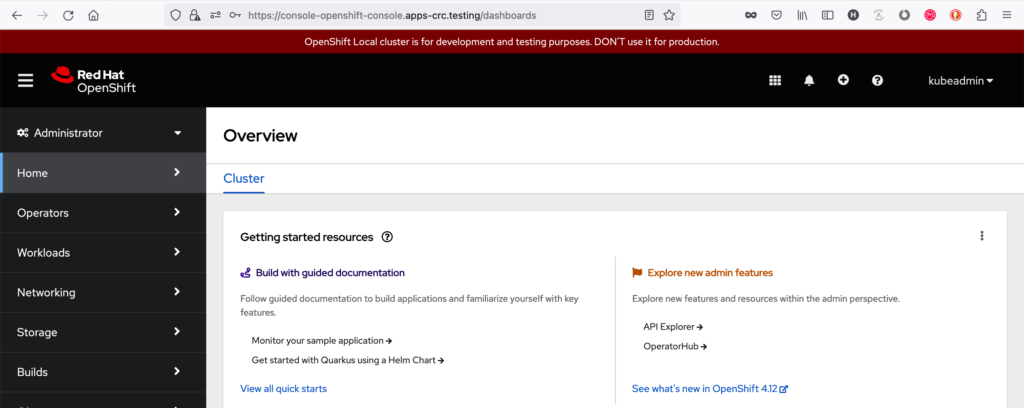
Things left to do:
- why is the daemon not starting via plist file (could be keychain lock issue on mac…)
chrisp:~ sandorm$  security list-keychains
list-keychains
    "/Users/sandorm/Library/Keychains/login.keychain-db"
    "/Library/Keychains/System.keychain"

chrisp:~ sandorm$  security unlock-keychain "/Users/sandorm/Library/Keychains/login.keychain-db"
password to unlock /Users/sandorm/Library/Keychains/login.keychain-db:
*****
Starting and stopping:
(note, error dialing… will reappear…)
chrisp:~ sandorm$ crc stop
INFO Stopping kubelet and all containers...
INFO Updating kernel args...
INFO Stopping the instance, this may take a few minutes...
Stopped the instance

# ist the start now faster ?
crc start # --log-level=debug
INFO Checking if running as non-root
INFO Checking if crc-admin-helper executable is cached
INFO Checking if running on a supported CPU architecture
INFO Checking minimum RAM requirements
INFO Checking if crc executable symlink exists
INFO Checking if running emulated on a M1 CPU
INFO Checking if vfkit is installed
INFO Checking if old launchd config for tray and/or daemon exists
INFO Checking if crc daemon plist file is present and loaded
INFO Loading bundle: crc_vfkit_4.12.1_amd64...
INFO Starting CRC VM for openshift 4.12.1...
INFO CRC instance is running with IP 127.0.0.1
INFO CRC VM is running
INFO Configuring shared directories
INFO Check internal and public DNS query...
INFO Check DNS query from host...
INFO Verifying validity of the kubelet certificates...
INFO Starting kubelet service
INFO Waiting for kube-apiserver availability... [takes around 2min]

Started the OpenShift cluster.
So, using the workaround crc daemon start, I can start and stop the OpenShift Local cluster on my mac again (MacBook Pro, Ventura 13.2.1)
plist start
plist are files for launchd. launchctl is the command to run processes specified in plist files. How do we find the one used for crc / OpenShift Local ?
chrisp:~ sandorm$ launchctl list | grep crc
-	78	com.redhat.crc.daemon

man launchd
...
     ~/Library/LaunchAgents         Per-user agents provided by the user.
     /Library/LaunchAgents          Per-user agents provided by the administrator.
     /Library/LaunchDaemons         System-wide daemons provided by the administrator.
     /System/Library/LaunchAgents   Per-user agents provided by Apple.
     /System/Library/LaunchDaemons  System-wide daemons provided by Apple.

find ~/Library/Launch*  | grep crc
/Users/sandorm/Library/LaunchAgents/com.redhat.crc.daemon.plist

chrisp:~ sandorm$ cat /Users/sandorm/Library/LaunchAgents/com.redhat.crc.daemon.plist
<?xml version='1.0' encoding='UTF-8'?>
<!DOCTYPE plist PUBLIC "-//Apple Computer//DTD PLIST 1.0//EN" "http://www.apple.com/DTDs/PropertyList-1.0.dtd">
<plist version='1.0'>
<dict>
	<key>Label</key>
	<string>com.redhat.crc.daemon</string>
	<key>ProgramArguments</key>
	<array>
		<string>/Users/sandorm/.crc/bin/crc</string>

		<string>daemon</string>

		<string>--log-level=debug</string>

	</array>
	<key>StandardOutPath</key>
	<string>/Users/sandorm/.crc/.launchd-crcd.log</string>
	<key>StandardErrorPath</key>
	<string>/Users/sandorm/.crc/.launchd-crcd.log</string>
	<key>EnvironmentVariables</key>
	<dict>

		<key>Version</key>
		<string>2.14.0</string>

	</dict>
	<key>RunAtLoad</key>
	<true/>
</dict>
</plist>

ls -lrt     /Users/sandorm/.crc/
total 505616
-rw-------  1 sandorm  staff        113 Feb 20 13:13 crc.json
drwxr-x---  4 sandorm  staff        128 Feb 20 17:22 bin
-rw-r--r--  1 sandorm  staff         40 Feb 23 09:28 segmentIdentifyHashForTray
-rw-------  1 sandorm  staff          8 Feb 23 09:28 segmentIdentifyHash
drwxrwxr-x  4 sandorm  staff        128 Feb 23 10:05 cache
srwxr-xr-x  1 sandorm  staff          0 Feb 23 10:10 tap.sock
srwxr-xr-x  1 sandorm  staff          0 Feb 23 10:10 crc-http.sock
drwx------  3 sandorm  staff         96 Feb 23 10:10 machines
-rw-------  1 sandorm  staff     244417 Feb 23 21:31 crc.log
-rw-------  1 sandorm  staff  241888300 Feb 23 21:39 crcd.log
So ! Unloading/loading crc should log to ~/.crc/.launchd-crcd.log (but nothing there). Lets check ~/.crc/crcd.log and crc.log:
time=“2023-02-23T10:05:48+01:00″ level=debug msg=“Running ‚launchctl load -w /Users/sandorm/Library/LaunchAgents/com.redhat.crc.daemon.plist‚“
time=“2023-02-23T10:05:48+01:00″ level=debug msg=“Running ‚launchctl stop com.redhat.crc.daemon'“
time=“2023-02-23T10:05:48+01:00″ level=debug msg=“Running ‚launchctl start com.redhat.crc.daemon‚“
launchctl load enables the service, start/stop do, well, start and stop.
Investigating with console.app (spacebar + console.app) reveals no useful information…
What crc processes run ?
crc-tray, vfkit
Lets logout/login, see if daemon is automatically started.
sandorm@chrisp:☸:(⎈ proj1/api-crc-testing:6443/kubeadmin - proj1)~$ crc daemon start --log-level=debug
DEBU CRC version: 2.14.0+868d96cd
DEBU OpenShift version: 4.12.1
DEBU Podman version: 4.3.1
DEBU Running 'crc daemon'
INFO listening /Users/sandorm/.crc/tap.sock
INFO listening /Users/sandorm/.crc/crc-http.sock
0B sent to the VM, 0B received from the VM
0B sent to the VM, 0B received from the VM

chrisp:.crc sandorm$ crc cleanup
INFO Unloading and removing the daemon plist file
INFO Removing /etc/resolver/testing file
INFO Stopping CRC vfkit process
INFO Removing hosts file records added by CRC
INFO Removing pull secret from the keyring
INFO Removing older logs
INFO Removing CRC Machine Instance directory
INFO Removing crc executable symlink
Cleanup finished

INFO Checking if old launchd config for tray and/or daemon exists
INFO Checking if crc daemon plist file is present and loaded
DEBU File not found: /Users/sandorm/Library/LaunchAgents/com.redhat.crc.daemon.plist: stat /Users/sandorm/Library/LaunchAgents/com.redhat.crc.daemon.plist: no such file or directory
INFO Adding crc daemon plist file and loading it
DEBU Creating plist for com.redhat.crc.daemon
DEBU Running 'launchctl load -w /Users/sandorm/Library/LaunchAgents/com.redhat.crc.daemon.plist'
DEBU Running 'launchctl stop com.redhat.crc.daemon'
DEBU Running 'launchctl start com.redhat.crc.daemon'

...
DEBU error: Temporary error: daemon is not running yet - sleeping 2s
DEBU RetryAfter timeout after 8 tries
DEBU Running 'sw_vers -productVersion'
Temporary error: daemon is not running yet (x8)
We are back to square 1 – not at all starting. Looking at console app again – sandbox restriction ?

Cleanup again, setup again, start again:
 crc delete --force --clear-cache
Machine does not exist. Use 'crc start' to create it
sandorm@chrisp:☸:(⎈ proj1/api-crc-testing:6443/kubeadmin - proj1)~$ crc setup --log-level=debug
DEBU CRC version: 2.14.0+868d96cd
DEBU OpenShift version: 4.12.1
DEBU Podman version: 4.3.1
DEBU Running 'crc setup'
INFO Using bundle path /Users/sandorm/.crc/cache/crc_vfkit_4.12.1_amd64.crcbundle
INFO Checking if running as non-root
INFO Checking if crc-admin-helper executable is cached
INFO Checking if running on a supported CPU architecture
DEBU GOARCH is amd64 GOOS is darwin
INFO Checking minimum RAM requirements
DEBU Total memory of system is 17179869184 bytes
INFO Checking if crc executable symlink exists
INFO Checking if running emulated on a M1 CPU
INFO Checking if vfkit is installed
INFO Checking if CRC bundle is extracted in '$HOME/.crc'
INFO Checking if /Users/sandorm/.crc/cache/crc_vfkit_4.12.1_amd64.crcbundle exists
DEBU error getting bundle info for crc_vfkit_4.12.1_amd64.crcbundle: could not find cached bundle info in /Users/sandorm/.crc/cache/crc_vfkit_4.12.1_amd64: stat /Users/sandorm/.crc/cache/crc_vfkit_4.12.1_amd64: no such file or directory
DEBU could not find cached bundle info in /Users/sandorm/.crc/cache/crc_vfkit_4.12.1_amd64: stat /Users/sandorm/.crc/cache/crc_vfkit_4.12.1_amd64: no such file or directory
INFO Getting bundle for the CRC executable
DEBU Ensuring directory /Users/sandorm/.crc/cache exists
DEBU Got bundle path: /Users/sandorm/.crc/cache/crc_vfkit_4.12.1_amd64.crcbundle
INFO Downloading bundle: /Users/sandorm/.crc/cache/crc_vfkit_4.12.1_amd64.crcbundle...
DEBU Downloading https://mirror.openshift.com/pub/openshift-v4/clients/crc/bundles/openshift/4.12.1/crc_vfkit_4.12.1_amd64.crcbundle to /Users/sandorm/.crc/cache/crc_vfkit_4.12.1_amd64.crcbundle
1.75 GiB / 3.15 GiB [--------------------------------------------------------------------

crc start
crc start
INFO Checking if running as non-root
INFO Checking if crc-admin-helper executable is cached
INFO Checking if running on a supported CPU architecture
INFO Checking minimum RAM requirements
INFO Checking if crc executable symlink exists
INFO Checking if running emulated on a M1 CPU
INFO Checking if vfkit is installed
INFO Checking if old launchd config for tray and/or daemon exists
INFO Checking if crc daemon plist file is present and loaded
INFO Loading bundle: crc_vfkit_4.12.1_amd64...
INFO Creating CRC VM for openshift 4.12.1...
INFO Generating new SSH key pair...
INFO Generating new password for the kubeadmin user
INFO Starting CRC VM for openshift 4.12.1...
INFO CRC instance is running with IP 127.0.0.1
INFO CRC VM is running
INFO Updating authorized keys...
INFO Configuring shared directories
INFO Check internal and public DNS query...
INFO Check DNS query from host...
INFO Verifying validity of the kubelet certificates...
INFO Starting kubelet service
INFO Waiting for kube-apiserver availability... [takes around 2min]
...
Conclusion: crc daemon start manually works, 0 bytes send to the VM is normal – until crc start is running. plist / launchd start is NOT working on Ventura currently.